
Centralized Log Management in AWS using AWS CloudTrail
Introduction
As organizations migrate workloads to cloud providers like AWS, the volume and variety of operational logs grow rapidly. Logs are generated from cloud services, infrastructure, and account-level events, resulting in trillions of entries with different purposes and audiences. Traditional log management tools are often unable to handle this scale, making a new approach necessary.
This blog post introduces concept of centralized log management in AWS. It explores why centralization is critical in a distributed cloud environment, the business benefits it delivers, the challenges it poses, and the specific steps for implementation within AWS.
The Case for Centralized Log Management
Different IT environments runs across microservices, databases, and infrastructure. Each system generates logs in different formats, often designed for different users. Without a unified way to manage them, troubleshooting issues and meeting compliance requirements can quickly become disorganized and inefficient.
Centralized log management addresses these challenges by offering:
- Faster detection and response to incidents
- Greater operational efficiency through unified visibility
- Stronger security with complete oversight of activity
- Easier compliance with regulatory requirements
What is AWS Centralized Logging?
AWS centralized logging means collecting, storing, and analyzing logs from multiple AWS services in one place. Instead of switching between CloudWatch, S3, and application logs, you gain a single pane of glass view.
Benefits:
- Detect cross-service patterns
- Accelerate troubleshooting
- Improve monitoring and alerting
Example: Multi-Account Centralized Logging

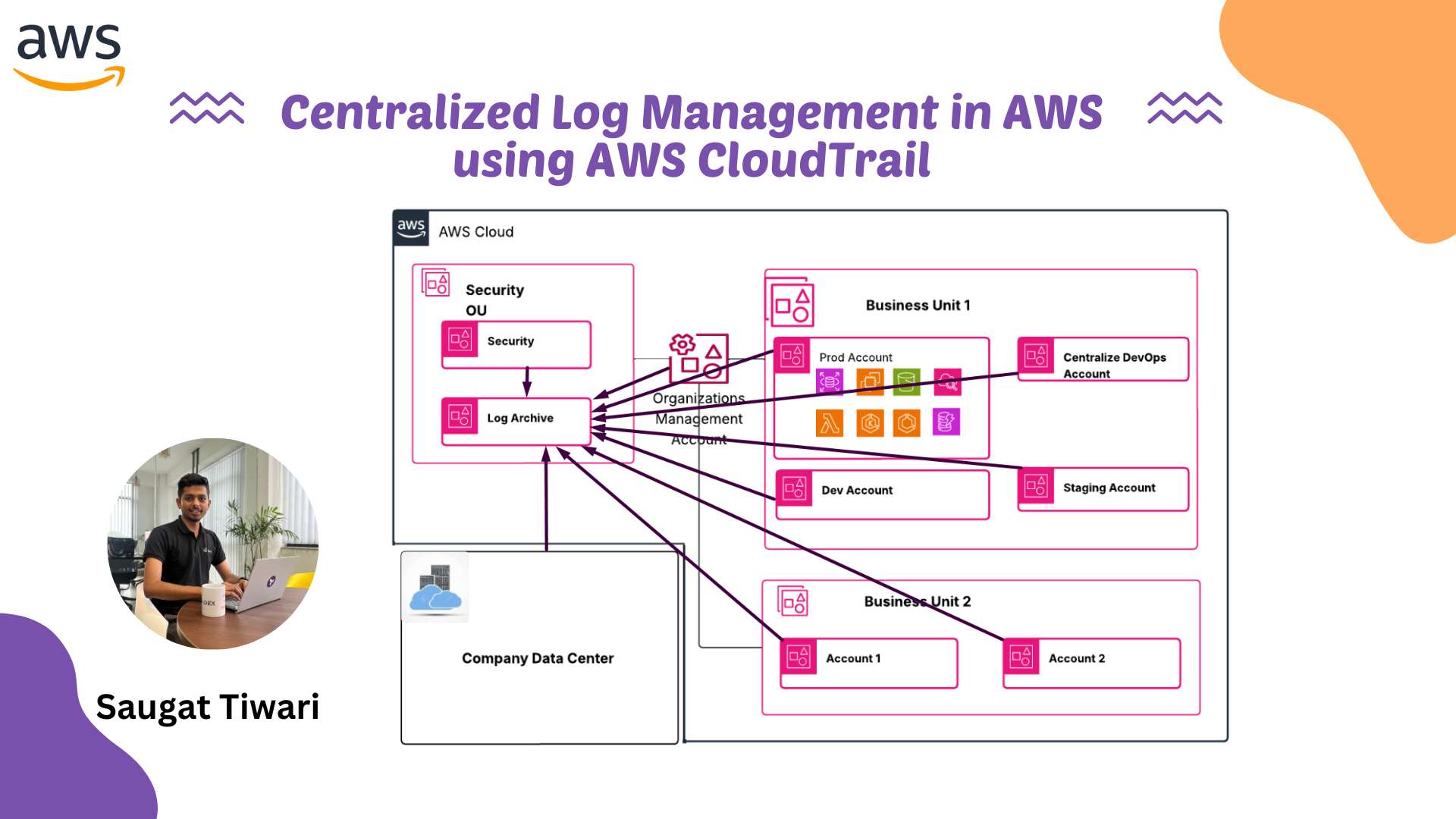
The diagram illustrates a centralized log management setup within AWS. At the core is a Security OU that houses the Log Archive account, responsible for collecting logs from across the organization. Production, development, staging, centralized DevOps, and business unit accounts all send their logs to this centralized location. The Organizations Management account oversees the overall structure and applies policies consistently across accounts. Even the company’s on-premises data center integrates with this setup, feeding its logs into the same Log Archive. By consolidating everything into one secure account, the architecture provides unified visibility, simplifies compliance, and strengthens monitoring across the entire environment.
Log Archive Account
The Log Archive account is where you centralize infrastructure, service, and application log types. This account centralizes infrastructure, service, and application logs. All log types, including CloudTrail organization trails, filtered regional trails, VPC flow logs, access logs, and DNS logs, are stored in an S3 bucket for central logging. With a dedicated account, you can enforce consistent security controls, retention policies, and access management in one place. This ensures incident responders have a single source of truth for investigations and reduces privacy and compliance overhead.

The diagram shows how security services and guardrails, such as AWS Security Hub, Amazon GuardDuty, AWS Config, AWS CloudTrail, and IAM Access Analyzer to integrate with the Log Archive account to provide monitoring, detection, and compliance enforcement across the environment. Access is controlled using IAM roles and permissions to ensure only authorized users can retrieve or analyze logs.
Benefits of Centralized Logging for DevOps Teams
Without centralization, DevOps teams waste time:
- Searching logs across services
- Missing connections between events
- Struggling during incidents
- Unable to set meaningful alerts
AWS reports that centralized logging can reduce incident response time by 30–50%. That translates to better uptime and happier customers.
CloudWatch Logs + Insights: The AWS Native Solution
The simplest approach uses AWS’s built-in services:
- All AWS services send logs to CloudWatch Logs
- CloudWatch Log Insights provides the search and analysis layer
- CloudWatch Dashboards visualize the important metrics
Pros: Native AWS integration, minimal setup, works with most AWS services out of the box
Cons: Limited retention options, can get expensive at scale, less flexible for custom analysis
Steps to enable Organizational Central Logging
Step 1: Create a Central Logging Account
1.1 Set Up a Dedicated Account
- Create a new AWS account specifically for centralized logging (e.g., “Log Archive Account”).
Instead of manually creating a Log Archive account, leverage the Landing Zone or AWS Control Tower setup
Step 2: Configure Centralized Logging
2.1 Set Up S3 Buckets ( If Landing Zone/Control tower setup
- In the Log Archive Account, create S3 buckets to store CloudTrail logs and AWS Config data.
- Enable versioning and MFA Delete on these buckets for additional protection.
2.2 Enable AWS CloudTrail
- In each member account, create a CloudTrail that delivers logs to the centralized S3 bucket in the Log Archive Account.
aws cloudtrail create-trail --name <trail-name> --s3-bucket-name <log-archive-bucket> --is-multi-region-trail
aws cloudtrail start-logging --name <trail-name>
2.3 Enable AWS Config
- Enable AWS Config in each member account and configure it to send configuration snapshots and compliance data to the centralized S3 bucket.
aws configservice put-configuration-recorder --configuration-recorder name=<recorder-name>,roleARN=<IAM-role-ARN>
aws configservice put-delivery-channel --delivery-channel name=<channel-name>,s3BucketName=<log-archive-bucket>
aws configservice start-configuration-recorder --configuration-recorder-name <recorder-name>
Step 3: Protect Logging Resources with IAM Policies and SCPs
3.1 IAM Policies
- Apply IAM policies in the Log Archive Account to restrict deletion actions on the S3 buckets.
{
  "Version": "2012-10-17",
  "Statement": [
    {
      "Effect": "Deny",
      "Action": [
        "s3:DeleteObject",
        "s3:DeleteBucket"
      ],
      "Resource": [
        "arn:aws:s3:::",
        "arn:aws:s3:::/*"
      ]
    }
  ]
}
3.2 Enable MFA Delete
- Enable MFA Delete on the S3 buckets in the Log Archive Account to add an extra layer of protection.
aws s3api put-bucket-versioning --bucket <log-archive-bucket> --versioning-configuration Status=Enabled,MFADelete=Enabled --mfa "arn:aws:iam::<account-id>:mfa/<mfa-device> <mfa-code>"
3.3 Service Control Policies (SCPs)
- Apply SCPs to organizational units to enforce restrictions across all accounts.
{
  "Version": "2012-10-17",
  "Statement": [
    {
      "Effect": "Deny",
      "Action": [
        "s3:DeleteObject",
        "s3:DeleteBucket"
      ],
      "Resource": [
        "arn:aws:s3:::",
        "arn:aws:s3:::/*"
      ]
    }
  ]
}
Step 4: Continuous Monitoring and Auditing
4.1 Enable AWS Config Rules
- Use AWS Config rules to continuously monitor the configuration of your AWS resources and ensure compliance with your policies.
4.2 Set Up AWS Security Hub
- Enable AWS Security Hub for a comprehensive view of your security posture across all accounts.
Step 5: Continuous Improvement
5.1 Regular Audits
- Conduct regular audits of your centralized logging setup to ensure it is functioning correctly and that logs are protected.
5.2 Adjust Policies as Needed
- Continuously refine IAM policies and SCPs based on changing security requirements and AWS updates.
Key Pitfalls to Avoid in Centralized Logging
1. Lack of Centralized Logging Setup
Avoidance: Ensure centralized logging is set up from the beginning to capture logs across all accounts. Use a dedicated Log Archive account to store logs.
2. Insufficient Protection of Log Data
Avoidance: Protect log data by enabling S3 bucket versioning and MFA Delete. Apply IAM policies and SCPs to prevent unauthorized deletion of logs.
3. Incomplete Log Collection
Avoidance: Configure AWS CloudTrail and AWS Config in every account to ensure all actions and configurations are logged. Verify that logs are consistently sent to the centralized S3 bucket.
4. Overlooking Multi-Region Log Collection
Avoidance: Set up multi-region CloudTrail trails to ensure log collection from all AWS regions, not just the default region.
5. Not Using SCPs Effectively
Avoidance: Apply SCPs to enforce log delivery and prevent the deletion of log-related resources. Regularly review and update SCPs to adapt to new security requirements.
6. Neglecting Continuous Monitoring
Avoidance: Use AWS Config rules and AWS Security Hub to continuously monitor compliance and security posture. Ensure that all accounts adhere to logging policies.
7. Failure to Regularly Audit Logs
Avoidance: Conduct regular audits to ensure that log data is intact, complete, and accessible. Review log settings and access permissions periodically.
8. Poor Incident Response Plan
Avoidance: Develop and implement an incident response plan that includes steps for investigating and responding to security incidents using centralized logs.
Troubleshooting
Common Issues and Solutions
- Issue: Logs not appearing in the centralized S3 bucket
- Solution:
- Verify that CloudTrail and AWS Config are properly configured to send logs to the correct S3 bucket.
- Check IAM permissions to ensure logging services have write access to the S3 bucket.
- Ensure that there are no network issues preventing log delivery.
- Solution:
- Issue: Unauthorized deletion of logs
- Solution:
- Ensure that IAM policies and SCPs are correctly applied to prevent log deletion.
- Enable MFA Delete on the S3 buckets storing logs.
- Solution:
- Issue: Inconsistent logging across regions
- Solution:
- Configure multi-region trails in CloudTrail to ensure logs are collected from all AWS regions.
- Verify that AWS Config is enabled in all regions where resources are deployed.
- Solution:
- Issue: Logs not being retained as expected
- Solution:
- Check the lifecycle policies on the S3 bucket to ensure logs are retained for the required period.
- Ensure versioning is enabled on the S3 bucket to prevent accidental deletion.
- Solution:
Debugging Tips
- Use AWS CloudTrail to audit API calls and identify any permission issues or unexpected actions.
- Leverage AWS Config to assess the compliance of your resources against your defined rules and policies.
- Utilize the AWS Organizations CLI for troubleshooting. Commands like list-policies and list-targets-for-policy can provide valuable insights.
- When troubleshooting SCPs, remember to check policies at all levels of the OU hierarchy, as they are inherited and combined.
- For logging issues, review the CloudTrail and AWS Config logs for errors or misconfigurations.
Conclusion
Centralized logging in AWS is essential for auditability, compliance, and security. A dedicated Log Archive account, CloudTrail, and AWS Config provide the backbone. IAM policies, SCPs, and MFA Delete enforce integrity.
By avoiding pitfalls and applying continuous improvement, organizations achieve reliable, scalable, and secure centralized logging across AWS environments.
Stay tuned for more. Let’s connect on Linkedin and explore my GitHub for future insights.