
AWS Lambda MicroVMs, Part 2: Building a Multi-Tenant Code Sandbox with Lifecycle Hooks and Suspend/Resume
Introduction
In Part 1, I went from zero to a Flask app answering on a dedicated HTTPS endpoint inside a Firecracker MicroVM. That proved the service works. It did not prove you can build a product on it.
A real multi-tenant platform needs more than one MicroVM and a curl command. It needs a way to hand each user their own VM, inject per-user config without baking it into the snapshot, survive suspend and resume cleanly, and issue short-lived access tokens from a backend instead of your laptop.
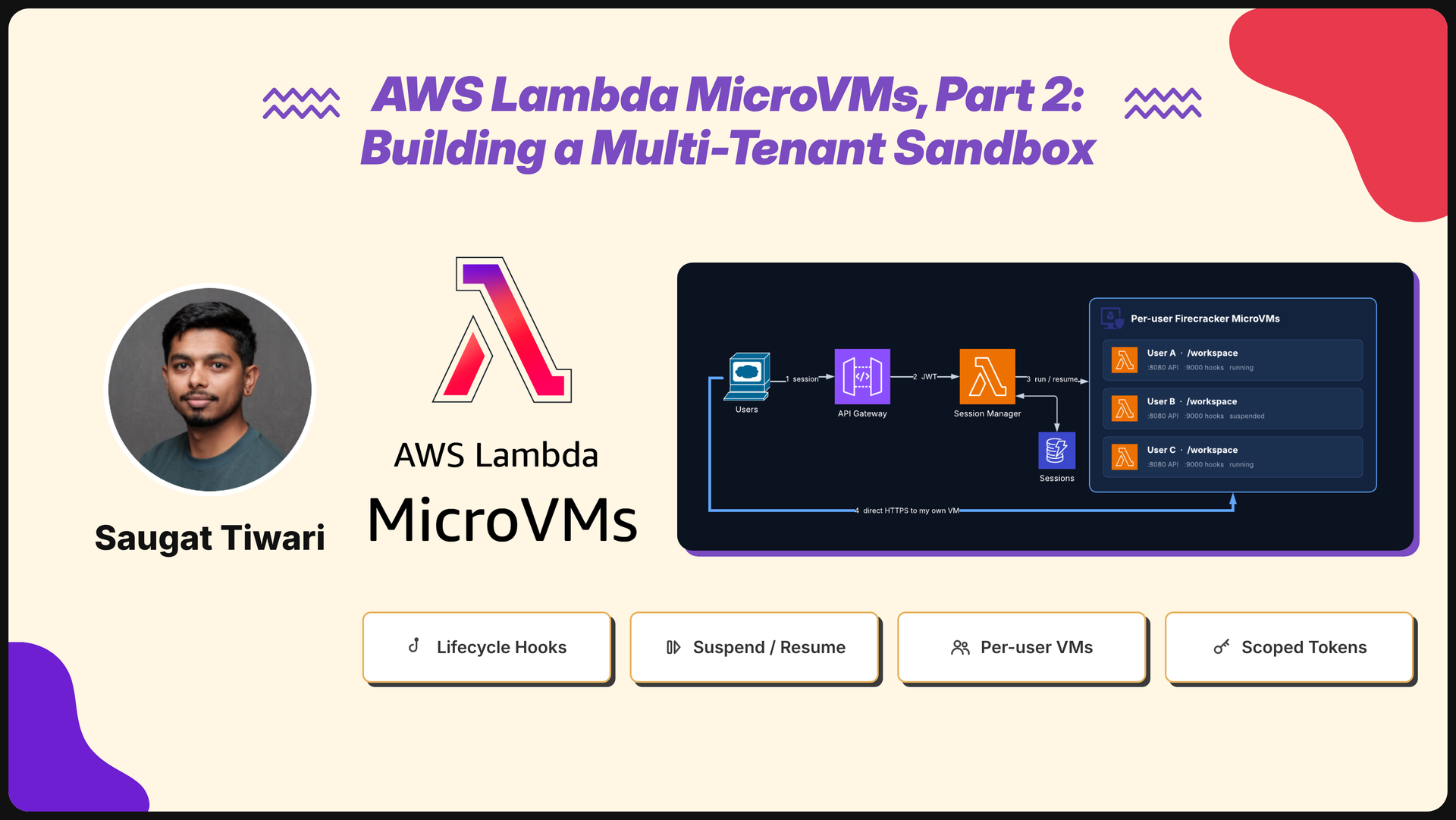
In this post I build exactly that: a per-user Python code sandbox. Each user gets a dedicated MicroVM with a persistent /workspace, a session manager Lambda maps users to VMs, and lifecycle hooks handle everything that must happen at run, suspend, resume and terminate time.
By the end you will have:
- A sandbox image with all four runtime hooks plus the
/readybuild hook enabled - A session manager Lambda that creates, resumes and reuses one MicroVM per user
- A tested suspend/resume cycle where files written before suspend are still there after
- A hardening checklist and a real cost estimate
If you have not done Part 1 yet, start there. This post assumes the IAM roles, S3 bucket and CLI setup from that guide.
What I am Building - Architectural Description
The backend only brokers access; once a user has a token, their traffic goes straight to their own MicroVM and never touches your API again.

- The client calls
POST /sessionswith the user’s JWT. - API Gateway verifies the JWT and invokes the session manager Lambda.
- The session manager looks up the user’s MicroVM in DynamoDB.
- If none is alive, it calls
run-microvm; if the VM is suspended, it resumes it. Either way it mints a 15-minute auth token scoped to port 8080. - The client calls the VM’s own HTTPS endpoint directly with that token.
Inside each VM, the sandbox API listens on 8080 and a separate hook server on 9000. Lambda calls the hooks internally; users can never reach them.
The Concepts Part 1 Skipped
Part 1 used the MicroVM like a tiny server: build, run, curl. Three concepts change how you design for it in production.
1. Every MicroVM starts from the same snapshot
During the image build, Lambda runs your CMD, waits for the app to be ready, then captures memory and disk, including running processes. Every MicroVM launched from that image version resumes from that exact state.
That is why startup is fast. It is also a trap. Anything your app generated during the build, such as a random session ID, a secret, a seeded RNG or an open database connection, is shared by every MicroVM run from that image. AWS’s docs say to generate unique content after start using the /run hook instead.
2. Lifecycle hooks
Hooks are plain HTTP POST endpoints your app exposes under /aws/lambda-microvms/runtime/v1/<hook>, on a port you choose at image build time. You enable each one individually.
| Hook | When Lambda calls it | Max timeout | What to do in it |
|---|---|---|---|
/ready | During image build, before the snapshot | 3600 s | Return 200 when the app is initialised, 503 to make Lambda retry |
/validate | During image build, on a test MicroVM | 3600 s | Smoke-test the app; Lambda also uses it to prefetch hot parts of the image |
/run | After a new MicroVM restores from the snapshot | 60 s | Read runHookPayload, set up per-tenant state, reseed randomness |
/suspend | Before the MicroVM is checkpointed | 60 s | Flush writes, close outbound connections |
/resume | After restore from suspend, before traffic flows | 60 s | Refresh credentials, reconnect |
/terminate | Before final teardown only | 60 s | Final flush, notify external systems |
Two details matter a lot:
- The endpoint does not forward traffic until
/runreturns 200. If/runfails or times out, the MicroVM can go straight toTERMINATINGwithout ever reachingRUNNING. - During
/resume, the VM is stillSUSPENDED. It flips toRUNNINGonly after the hook returns, and an auto-resumed request is held until then.
3. runHookPayload: per-VM config without rebuilding
run-microvm accepts a --run-hook-payload string of up to 16 KB. Lambda delivers it to your /run hook along with the microvmId:
{
  "microvmId": "mvm-01234567-abcd-ef01-2345-6789abcdef01",
  "runHookPayload": "{\"userId\":\"u-42\",\"plan\":\"pro\"}"
}
Image-level environment variables are shared by every VM. The run hook payload is unique per VM, so it is where tenant IDs, Secrets Manager ARNs or signed URLs belong. Never put raw secrets in it; pass a reference and let the execution role fetch the value.
Step 1: Build the Sandbox App
The app inside the MicroVM is split into two processes on two ports:
app.pyon port 8080: the public API users hit (/exec,/files,/health)hooks.pyon port 9000: the lifecycle hook server Lambda calls
Why split them? Users reach the MicroVM through auth tokens, and every token is scoped to specific ports. My backend will only ever issue tokens for port 8080, so nobody outside AWS can call /run or /terminate on your VM.
mkdir lambda-microvm-sandbox && cd lambda-microvm-sandbox
app.py
import json
import subprocess
import time
from pathlib import Path

from flask import Flask, jsonify, request

WORKSPACE = Path("/workspace")
SESSION_FILE = Path("/opt/sandbox/session.json")
MAX_CODE_BYTES = 64 * 1024
EXEC_TIMEOUT = 30

app = Flask(__name__)


def current_session():
    try:
        return json.loads(SESSION_FILE.read_text())
    except FileNotFoundError:
        return {}


@app.get("/health")
def health():
    s = current_session()
    return jsonify(status="ok", userId=s.get("userId"),
                   microvmId=s.get("microvmId"), resumeCount=s.get("resumeCount", 0))


@app.post("/exec")
def exec_code():
    code = (request.get_json(force=True) or {}).get("code", "")
    if len(code.encode()) > MAX_CODE_BYTES:
        return jsonify(error="code too large"), 413

    started = time.monotonic()
    try:
        proc = subprocess.run(
            ["python3", "-c", code],
            cwd=WORKSPACE,
            user="sandbox",            # untrusted code never runs as root
            env={"HOME": "/home/sandbox", "PATH": "/usr/bin:/bin"},
            capture_output=True, text=True, timeout=EXEC_TIMEOUT,
        )
        result = {"stdout": proc.stdout[-20000:], "stderr": proc.stderr[-20000:],
                  "exitCode": proc.returncode}
    except subprocess.TimeoutExpired:
        result = {"stdout": "", "stderr": f"timed out after {EXEC_TIMEOUT}s", "exitCode": -1}

    result["durationMs"] = int((time.monotonic() - started) * 1000)
    return jsonify(result)


@app.get("/files")
def list_files():
    return jsonify(sorted(str(p.relative_to(WORKSPACE))
                          for p in WORKSPACE.rglob("*") if p.is_file()))
Each /exec call runs in a fresh Python process as the unprivileged sandbox user, but /workspace persists. That gives users state across calls (files, datasets, outputs) while one bad script can’t crash the API server.
hooks.py
import json
import logging
import os
import secrets
import time
from pathlib import Path

from flask import Flask, request

BASE = "/aws/lambda-microvms/runtime/v1"
SESSION_FILE = Path("/opt/sandbox/session.json")

logging.basicConfig(level=logging.INFO)
log = logging.getLogger("hooks")
hooks = Flask(__name__)


def update_session(**fields):
    data = json.loads(SESSION_FILE.read_text()) if SESSION_FILE.exists() else {}
    data.update(fields)
    SESSION_FILE.write_text(json.dumps(data))
    os.chmod(SESSION_FILE, 0o600)   # root-only: the sandbox user can't read it
    return data


@hooks.post(f"{BASE}/ready")
def ready():
    # Build time. Everything imported and initialised so far goes into the snapshot.
    return "", 200


@hooks.post(f"{BASE}/run")
def run():
    body = request.get_json(force=True)
    payload = json.loads(body.get("runHookPayload") or "{}")
    s = update_session(
        microvmId=body["microvmId"],
        userId=payload.get("userId"),
        plan=payload.get("plan", "free"),
        instanceSecret=secrets.token_hex(16),   # generated per VM, never at build time
        startedAt=time.time(),
        resumeCount=0,
    )
    log.info("run user=%s vm=%s", s["userId"], s["microvmId"])
    return "", 200


@hooks.post(f"{BASE}/suspend")
def suspend():
    os.sync()   # flush workspace writes before the checkpoint
    update_session(lastSuspendAt=time.time())
    log.info("suspend")
    return "", 200


@hooks.post(f"{BASE}/resume")
def resume():
    s = json.loads(SESSION_FILE.read_text())
    update_session(lastResumeAt=time.time(), resumeCount=s.get("resumeCount", 0) + 1)
    # Refresh any credentials or reopen outbound connections here.
    log.info("resume")
    return "", 200


@hooks.post(f"{BASE}/terminate")
def terminate():
    # Last chance: e.g. archive /workspace to S3 for the user. Must finish within the timeout.
    os.sync()
    log.info("terminate")
    return "", 200
💡 Important: Keep every hook fast. Runtime hooks have a hard ceiling of 60 seconds, and a
/runhook that hangs means the VM never takes traffic. Return 200 as soon as the essential state is written; start anything slow in the background.
requirements.txt
flask==3.0.0
gunicorn==21.2.0
start.sh
#!/bin/sh
set -e
# Hook server (internal port, never exposed via auth tokens)
gunicorn --bind 0.0.0.0:9000 --workers 1 hooks:hooks &
# Public sandbox API
exec gunicorn --bind 0.0.0.0:8080 --workers 2 --timeout 60 app:app
Step 2: Write the Dockerfile
Dockerfile
FROM public.ecr.aws/lambda/microvms:al2023-minimal

RUN dnf install -y python3 python3-pip shadow-utils && dnf clean all

# Unprivileged user for untrusted code, plus the persistent workspace
RUN useradd --create-home --uid 1001 sandbox \
 && mkdir -p /workspace /opt/sandbox \
 && chown sandbox:sandbox /workspace

WORKDIR /opt/sandbox
COPY requirements.txt .
RUN pip3 install --no-cache-dir -r requirements.txt

# Pre-install anything users need here (numpy, pandas...). It lands in the snapshot,
# so every MicroVM gets it for free at launch.

COPY app.py hooks.py start.sh ./
RUN chmod +x start.sh

EXPOSE 8080 9000
CMD ["./start.sh"]
Package and upload it the same way as Part 1:
zip sandbox.zip app.py hooks.py start.sh requirements.txt Dockerfile
aws s3 cp sandbox.zip s3://<your-bucket>/sandbox.zip

Before uploading, run docker build . locally on an ARM64 machine (or with --platform linux/arm64). A Dockerfile error caught locally saves you a 2–5 minute build cycle in the cloud.
Step 3: Build the Image with Hooks Enabled
This is where Part 1’s command grows. Hooks are configured on the image, not at run time:
aws lambda-microvms create-microvm-image \
  --name python-sandbox \
  --code-artifact uri=s3://<your-bucket>/sandbox.zip \
  --base-image-arn arn:aws:lambda:us-east-1:aws:microvm-image:al2023-1 \
  --build-role-arn arn:aws:iam::<account-id>:role/MicroVMBuildRole \
  --resources minimumMemoryInMiB=2048 \
  --hooks '{
    "port": 9000,
    "microvmImageHooks": {
      "ready": "ENABLED", "readyTimeoutInSeconds": 120
    },
    "microvmHooks": {
      "run": "ENABLED",       "runTimeoutInSeconds": 15,
      "suspend": "ENABLED",   "suspendTimeoutInSeconds": 15,
      "resume": "ENABLED",    "resumeTimeoutInSeconds": 15,
      "terminate": "ENABLED", "terminateTimeoutInSeconds": 30
    }
  }' \
  --tags project=sandbox,env=dev \
  --region us-east-1

What changed from Part 1:
--hookstells Lambda which hooks exist and on which port. Each value isENABLEDorDISABLED, not a path; Lambda always uses the fixed/aws/lambda-microvms/runtime/v1/...paths.--resources minimumMemoryInMiB=2048sets the baseline size (1 vCPU / 2 GB). A running MicroVM can burst up to 4x its baseline, and you pay for the burst only while it is used.--tagslets you split cost by project in Cost Explorer later.
Poll the image until the build completes, then check the version:
aws lambda-microvms get-microvm-image \
  --image-identifier arn:aws:lambda:us-east-1:<account-id>:microvm-image:python-sandbox \
  --query '{state: state, version: latestActiveImageVersion}'
Once the roles are in place and the artifact is valid, the build settles into Created: you can confirm it either from the poll above or in the MicroVM Images console:

💡 zsh gotcha: the
<account-id>placeholder is written with angle brackets, which zsh (and bash) read as redirection operators, paste it verbatim and you getzsh: no such file or directory: account-id. Replace<account-id>with your real 12-digit account ID before running. This applies to every command in this post that contains a<...>placeholder, so substitute them all first.
If the build fails with the /ready hook enabled, check /aws/lambda-microvms/python-sandbox in CloudWatch first. The most common cause is the hook server not listening on the port declared in --hooks.
💡 Updating later:
update-microvm-imagetakes the same flags and triggers a new image version. Running MicroVMs keep the version they launched from, so you can roll a new image without disturbing live sessions.
When the build fails before it ever runs your app
My first build came back CREATE_FAILED in about 40 seconds, well short of the /ready timeout. A build that dies that fast never reached your app, so CloudWatch had no /aws/lambda-microvms/python-sandbox log group at all. The reason only shows up at the version level, not in the summary query:
aws lambda-microvms get-microvm-image-version \
  --image-identifier arn:aws:lambda:us-east-1:<account-id>:microvm-image:python-sandbox \
  --image-version 1.0 --output json
The stateReason told the whole story:
"stateReason": "We were unable to assume the role provided. Please verify that your trust policy is correct."
The MicroVMBuildRole from Part 1 was gone, so the build service had nothing to assume. If you cleaned up after Part 1, or are starting Part 2 on a fresh account, recreate both roles before building. The trust principal is lambda.amazonaws.com (not microvms.lambda.amazonaws.com, which does not exist):
cat > microvm-trust.json << 'EOF'
{
  "Version": "2012-10-17",
  "Statement": [
    { "Effect": "Allow", "Principal": { "Service": "lambda.amazonaws.com" }, "Action": "sts:AssumeRole" }
  ]
}
EOF

# Build role: read the S3 artifact, write build logs, pull the base image
aws iam create-role --role-name MicroVMBuildRole \
  --assume-role-policy-document file://microvm-trust.json
aws iam attach-role-policy --role-name MicroVMBuildRole \
  --policy-arn arn:aws:iam::aws:policy/AmazonS3ReadOnlyAccess
aws iam attach-role-policy --role-name MicroVMBuildRole \
  --policy-arn arn:aws:iam::aws:policy/CloudWatchLogsFullAccess
aws iam attach-role-policy --role-name MicroVMBuildRole \
  --policy-arn arn:aws:iam::aws:policy/AmazonEC2ContainerRegistryReadOnly

# Execution role: what each MicroVM runs as
aws iam create-role --role-name MicroVMExecutionRole \
  --assume-role-policy-document file://microvm-trust.json
aws iam attach-role-policy --role-name MicroVMExecutionRole \
  --policy-arn arn:aws:iam::aws:policy/service-role/AWSLambdaBasicExecutionRole
aws iam attach-role-policy --role-name MicroVMExecutionRole \
  --policy-arn arn:aws:iam::aws:policy/CloudWatchLogsFullAccess

# Verify both exist before rebuilding
aws iam get-role --role-name MicroVMBuildRole --query 'Role.Arn' --output text
aws iam get-role --role-name MicroVMExecutionRole --query 'Role.Arn' --output text

Both roles should now appear in the IAM console, each trusting AWS Service: lambda:

IAM changes take a few seconds to propagate. Rerun the create-microvm-image command (or update-microvm-image if the image resource already exists), and if the first rebuild still reports an assume-role error, wait about 15 seconds and trigger it once more.
Step 4: The Session Manager Lambda
In Part 1 you ran run-microvm and create-microvm-auth-token by hand. In production, a backend does it. My session manager is a regular Lambda Function behind an API Gateway HTTP API with a JWT authorizer (Cognito or any OIDC provider). It has one job: given a user, return an endpoint and a short-lived token for that user’s MicroVM.
The state it keeps is tiny, one DynamoDB item per user:
aws dynamodb create-table \
  --table-name sandbox-sessions \
  --attribute-definitions AttributeName=userId,AttributeType=S \
  --key-schema AttributeName=userId,KeyType=HASH \
  --billing-mode PAY_PER_REQUEST

aws dynamodb update-time-to-live \
  --table-name sandbox-sessions \
  --time-to-live-specification Enabled=true,AttributeName=ttl
session_manager.py
import json
import os
import time

import boto3
from botocore.exceptions import ClientError

mvm = boto3.client("lambda-microvms")
table = boto3.resource("dynamodb").Table(os.environ["SESSIONS_TABLE"])

REGION = os.environ["AWS_REGION"]
IMAGE_ARN = os.environ["IMAGE_ARN"]
EXEC_ROLE_ARN = os.environ["EXEC_ROLE_ARN"]
CONNECTOR = f"arn:aws:lambda:{REGION}:aws:network-connector:aws-network-connector"
INGRESS = f"{CONNECTOR}:ALL_INGRESS"
EGRESS = os.environ.get("EGRESS_CONNECTOR_ARN", f"{CONNECTOR}:INTERNET_EGRESS")

IDLE_POLICY = {
    "autoResumeEnabled": True,
    "maxIdleDurationSeconds": 600,      # suspend after 10 min without traffic
    "suspendedDurationSeconds": 3600,   # terminate after 1 h suspended
}
MAX_DURATION = 4 * 3600                 # hard ceiling, running + suspended
TOKEN_MINUTES = 15
LIVE_STATES = {"PENDING", "RUNNING", "SUSPENDING", "SUSPENDED"}


def find_live_vm(user_id):
    item = table.get_item(Key={"userId": user_id}).get("Item")
    if not item:
        return None, None
    try:
        vm = mvm.get_microvm(microvmIdentifier=item["microvmId"])
        return (vm if vm["state"] in LIVE_STATES else None), item
    except mvm.exceptions.ResourceNotFoundException:
        return None, item


def launch_vm(user_id, stale_item):
    vm = mvm.run_microvm(
        imageIdentifier=IMAGE_ARN,
        executionRoleArn=EXEC_ROLE_ARN,
        ingressNetworkConnectors=[INGRESS],
        egressNetworkConnectors=[EGRESS],
        idlePolicy=IDLE_POLICY,
        maximumDurationInSeconds=MAX_DURATION,
        runHookPayload=json.dumps({"userId": user_id, "plan": "free"}),
        clientToken=f"{user_id}-{int(time.time() // 60)}",  # safe retries
    )
    now = int(time.time())
    try:
        # Only one VM per user, even if two requests race.
        condition = ("attribute_not_exists(userId)" if stale_item is None
                     else "microvmId = :old")
        kwargs = {} if stale_item is None else {
            "ExpressionAttributeValues": {":old": stale_item["microvmId"]}}
        table.put_item(
            Item={"userId": user_id, "microvmId": vm["microvmId"],
                  "endpoint": vm["endpoint"], "createdAt": now,
                  "ttl": now + MAX_DURATION},
            ConditionExpression=condition, **kwargs)
    except ClientError as e:
        if e.response["Error"]["Code"] != "ConditionalCheckFailedException":
            raise
        mvm.terminate_microvm(microvmIdentifier=vm["microvmId"])  # lost the race
        vm, _ = find_live_vm(user_id)
    return vm


def open_session(user_id):
    vm, item = find_live_vm(user_id)
    if vm is None:
        vm = launch_vm(user_id, item)
    elif vm["state"] == "SUSPENDED":
        # Optional pre-warm: start resuming now so the user's first call is fast.
        mvm.resume_microvm(microvmIdentifier=vm["microvmId"])

    token = mvm.create_microvm_auth_token(
        microvmIdentifier=vm["microvmId"],
        expirationInMinutes=TOKEN_MINUTES,
        allowedPorts=[{"port": 8080}],   # never the hook port
    )
    return {"endpoint": vm["endpoint"],
            "token": token["authToken"]["X-aws-proxy-auth"],
            "expiresInMinutes": TOKEN_MINUTES}


def close_session(user_id):
    vm, _ = find_live_vm(user_id)
    if vm:
        mvm.terminate_microvm(microvmIdentifier=vm["microvmId"])
    table.delete_item(Key={"userId": user_id})
    return {"closed": True}


def handler(event, context):
    # Identity comes from the verified JWT, never from the request body.
    user_id = event["requestContext"]["authorizer"]["jwt"]["claims"]["sub"]
    route = event["routeKey"]

    if route == "POST /sessions":
        body = open_session(user_id)
    elif route == "DELETE /sessions":
        body = close_session(user_id)
    else:
        return {"statusCode": 404}
    return {"statusCode": 200, "headers": {"content-type": "application/json"},
            "body": json.dumps(body)}
A few design decisions worth calling out:
- The client never calls AWS. The browser gets an endpoint and a 15-minute token scoped to port 8080. When it expires, the client calls
POST /sessionsagain and gets a fresh one for the same VM. - The conditional write prevents duplicate VMs. Two tabs opening at once both launch a VM; only one write wins and the loser terminates its own VM.
- The idle policy does the cleanup. Ten quiet minutes suspends the VM; an hour suspended terminates it;
maximumDurationInSecondsis the backstop. DynamoDB TTL clears the stale mapping.
💡 Important: while the service is in preview, neither the Lambda runtime’s bundled
boto3nor the latest releasedboto3on PyPI includes thelambda-microvmsservice model, only the AWS CLI v2 ships it. Packagingboto3is necessary but not sufficient; you also have to vendor the model from the CLI into the bundledbotocore(shown in the deploy section below), orboto3.client("lambda-microvms")fails withUnknownServiceError.
Session manager IAM policy
Attach this to the session manager’s execution role (not the MicroVM’s):
{
  "Version": "2012-10-17",
  "Statement": [
    {
      "Sid": "ManageSandboxMicroVMs",
      "Effect": "Allow",
      "Action": [
        "lambda:RunMicrovm",
        "lambda:GetMicrovm",
        "lambda:ResumeMicrovm",
        "lambda:TerminateMicrovm",
        "lambda:CreateMicrovmAuthToken"
      ],
      "Resource": "*"
    },
    {
      "Sid": "PassNetworkConnectors",
      "Effect": "Allow",
      "Action": "lambda:PassNetworkConnector",
      "Resource": "*"
    },
    {
      "Sid": "PassSandboxExecutionRole",
      "Effect": "Allow",
      "Action": "iam:PassRole",
      "Resource": "arn:aws:iam::<account-id>:role/MicroVMExecutionRole"
    },
    {
      "Sid": "SessionTable",
      "Effect": "Allow",
      "Action": ["dynamodb:GetItem", "dynamodb:PutItem", "dynamodb:DeleteItem"],
      "Resource": "arn:aws:dynamodb:us-east-1:<account-id>:table/sandbox-sessions"
    }
  ]
}
The PassNetworkConnector statement is easy to miss: run-microvm attaches the ingress and egress connectors by ARN, and passing them is a distinct action from RunMicrovm. Leave it out and the call fails with AccessDeniedException ... not authorized to perform: lambda:PassNetworkConnector, surfacing to the client as a generic Internal Server Error.
Once it works, tighten Resource: "*" to your image and MicroVM ARNs. Check the exact action names in the IAM console’s policy editor for your region, since the service is new and the editor is the source of truth.
Package and deploy the function
The session manager runs as an ordinary x86 Lambda, so nothing here needs ARM. Packaging has two things that matter, and the second one bit me. First, bundle a recent boto3, the runtime’s built-in copy does not carry the lambda-microvms service model. Install it into a build/ directory:
mkdir -p build && pip3 install boto3 -t build
cp session_manager.py build/
cd build && zip -r ../session_manager.zip . && cd ..

That alone is not enough while the service is in preview: the released boto3/botocore on PyPI does not ship the lambda-microvms model either, only the AWS CLI v2 bundles it. Deploy as above and the function still dies at import with UnknownServiceError: Unknown service: 'lambda-microvms'. The fix is to vendor the model out of the CLI into the bundled botocore, re-zip, and push the code:
# Find the model the CLI ships (API version is a dated folder)
ls /usr/local/aws-cli/awscli/botocore/data/lambda-microvms/

# Vendor it into the bundled botocore, then re-zip
cp -r /usr/local/aws-cli/awscli/botocore/data/lambda-microvms build/botocore/data/
rm -f session_manager.zip
cd build && zip -rq ../session_manager.zip . && cd ..

aws lambda update-function-code \
  --function-name sandbox-session-manager \
  --zip-file fileb://session_manager.zip --region us-east-1
aws lambda wait function-updated \
  --function-name sandbox-session-manager --region us-east-1

💡 Confirm the model actually shipped in the zip with
unzip -l session_manager.zip | grep lambda-microvms, you should seebotocore/data/lambda-microvms/<version>/service-2.json. Onceboto3catches up to the GA release this vendoring step goes away, but today it is mandatory.
Create the function’s own role, attach the basic execution policy, then put the inline policy from above (with your account ID substituted):
aws iam create-role --role-name SandboxSessionManagerRole \
  --assume-role-policy-document file://microvm-trust.json
aws iam attach-role-policy --role-name SandboxSessionManagerRole \
  --policy-arn arn:aws:iam::aws:policy/service-role/AWSLambdaBasicExecutionRole
aws iam put-role-policy --role-name SandboxSessionManagerRole \
  --policy-name session-manager --policy-document file://sm-policy.json

Then create the function, wiring the image ARN, execution role and sessions table in as environment variables:
aws lambda create-function \
  --function-name sandbox-session-manager \
  --runtime python3.12 --handler session_manager.handler \
  --role arn:aws:iam::<account-id>:role/SandboxSessionManagerRole \
  --zip-file fileb://session_manager.zip \
  --timeout 30 \
  --environment "Variables={SESSIONS_TABLE=sandbox-sessions,IMAGE_ARN=arn:aws:lambda:us-east-1:<account-id>:microvm-image:python-sandbox,EXEC_ROLE_ARN=arn:aws:iam::<account-id>:role/MicroVMExecutionRole}"

The function comes back State: Pending with StateReasonCode: Creating normal for the first few seconds while Lambda provisions it. Confirm the environment variables landed and wait for it to flip to Active:

A few seconds later the sandbox-session-manager function shows up in the Lambda console as a standard Python 3.12 Zip function, ready to wire behind API Gateway:

💡 IAM propagation: if
create-functionfails with an “cannot be assumed” error on a brand-new role, wait about 10 seconds and rerun the role just has not propagated yet.
Front it with API Gateway and a Cognito authorizer
The function identifies callers from a verified JWT, so it needs an identity provider in front. Any OIDC issuer works; a Cognito user pool is the quickest to stand up. Create the pool, an app client with password auth (so a test token can be minted from the CLI), and a test user:
POOL_ID=$(aws cognito-idp create-user-pool --pool-name sandbox-users \
  --query 'UserPool.Id' --output text); echo "POOL_ID=$POOL_ID"

CLIENT_ID=$(aws cognito-idp create-user-pool-client \
  --user-pool-id "$POOL_ID" --client-name sandbox-cli \
  --explicit-auth-flows ALLOW_USER_PASSWORD_AUTH ALLOW_REFRESH_TOKEN_AUTH \
  --query 'UserPoolClient.ClientId' --output text); echo "CLIENT_ID=$CLIENT_ID"

aws cognito-idp admin-create-user --user-pool-id "$POOL_ID" \
  --username testuser --message-action SUPPRESS

admin-create-user leaves the user in FORCE_CHANGE_PASSWORD, which would block CLI login:

The pool now shows up in the Cognito console:

Its overview page is where you copy the exact pool ID and issuer URL: copy them from here rather than retyping, since the ID mixes letters and digits (us-east-1_Keajnx9O6 ends in a capital O, not a zero) and a single wrong glyph produces a ResourceNotFoundException later:

Clear it by setting a permanent password, then save the issuer URL for the authorizer:
aws cognito-idp admin-set-user-password --user-pool-id "$POOL_ID" \
  --username testuser --password 'Sandbox#12345' --permanent

ISSUER="https://cognito-idp.us-east-1.amazonaws.com/$POOL_ID"; echo "ISSUER=$ISSUER"
Now create the HTTP API with a Lambda proxy integration, a JWT authorizer pointing at the pool, and the two protected routes:
FN_ARN=$(aws lambda get-function --function-name sandbox-session-manager \
  --query 'Configuration.FunctionArn' --output text)

API_ID=$(aws apigatewayv2 create-api --name sandbox-api --protocol-type HTTP \
  --target "$FN_ARN" --query 'ApiId' --output text); echo "API_ID=$API_ID"

AUTH_ID=$(aws apigatewayv2 create-authorizer --api-id "$API_ID" --name cognito-jwt \
  --authorizer-type JWT --identity-source '$request.header.Authorization' \
  --jwt-configuration "Issuer=$ISSUER,Audience=$CLIENT_ID" \
  --query 'AuthorizerId' --output text)

INT_ID=$(aws apigatewayv2 get-integrations --api-id "$API_ID" \
  --query 'Items[0].IntegrationId' --output text)

for ROUTE in "POST /sessions" "DELETE /sessions"; do
  aws apigatewayv2 create-route --api-id "$API_ID" --route-key "$ROUTE" \
    --target "integrations/$INT_ID" --authorization-type JWT --authorizer-id "$AUTH_ID"
done

aws lambda add-permission --function-name sandbox-session-manager \
  --statement-id apigw-invoke --action lambda:InvokeFunction \
  --principal apigateway.amazonaws.com \
  --source-arn "arn:aws:execute-api:us-east-1:<account-id>:$API_ID/*/*/sessions"

echo "API=https://$API_ID.execute-api.us-east-1.amazonaws.com"

The add-permission call returns the resource policy statement it attached, scoped to the /sessions routes on this exact API:

Because create-api --target auto-deploys a $default stage, the API is live the moment the routes exist, the final echo prints the base URL you will call in Step 5:

In the console the API shows up as a regional HTTP API:

with the POST and DELETE routes under /sessions, both backed by the Lambda proxy integration:

And on the Lambda side, the function now shows API Gateway wired in as its trigger:

💡 Use the ID token, not the access token: the JWT authorizer validates the
audclaim against your app client id, and Cognito only puts the client id inaudfor the ID token. Authenticate with the access token and every call comes back401.
Step 5: Test Suspend and Resume End to End
The whole point of this architecture is that a user can walk away, the VM suspends, and when they come back their files are still there. Let me prove it.
Mint an ID token. Authenticate the test user against the pool and grab the ID token (not the access token, see the authorizer note above). Pull the pool ID straight from list-user-pools rather than typing it; a single look-alike character (0 vs O) produces a ResourceNotFoundException that is maddening to spot by eye:
export AWS_DEFAULT_REGION=us-east-1

POOL_ID=$(aws cognito-idp list-user-pools --max-results 20 \
  --query "UserPools[?Name=='sandbox-users'].Id | [0]" --output text)

aws cognito-idp admin-set-user-password \
  --user-pool-id "$POOL_ID" --username testuser \
  --password 'Sandbox#12345' --permanent

JWT=$(aws cognito-idp initiate-auth \
  --auth-flow USER_PASSWORD_AUTH \
  --client-id <your-app-client-id> \
  --auth-parameters USERNAME=testuser,PASSWORD='Sandbox#12345' \
  --query 'AuthenticationResult.IdToken' --output text)
echo "${JWT:0:40}..."

Open a session:
API=https://<api-id>.execute-api.us-east-1.amazonaws.com

SESSION=$(curl -s -X POST "$API/sessions" -H "Authorization: Bearer $JWT")
EP=$(echo "$SESSION" | jq -r .endpoint)
TOKEN=$(echo "$SESSION" | jq -r .token)
This first call launches a MicroVM and records the user-to-VM mapping. You can see the row land in the sandbox-sessions table: one item keyed by the user’s sub, carrying the microvmId, endpoint and TTL:

The matching MicroVM shows up Running in the console, launched from the python-sandbox image:

Its details page is a useful sanity check that the session manager’s idlePolicy and connectors were applied: Suspend after 600 seconds, Terminate after 3600 seconds, Max lifetime 14400 seconds, with ALL_INGRESS and INTERNET_EGRESS connectors: exactly the values set in session_manager.py:

Write a file into the workspace:
curl -s "https://$EP/exec" \
  -H "X-aws-proxy-auth: $TOKEN" -H 'content-type: application/json' \
  -d '{"code": "open(\"notes.txt\", \"w\").write(\"written before suspend\")"}'
Suspend the VM explicitly (instead of waiting 10 minutes for the idle policy):
VM=$(curl -s "https://$EP/health" -H "X-aws-proxy-auth: $TOKEN" | jq -r .microvmId)

aws lambda-microvms suspend-microvm --microvm-identifier "$VM"

# Repeat until it prints "SUSPENDED"
aws lambda-microvms get-microvm --microvm-identifier "$VM" --query state
Read the file back. This request hits a suspended VM, so auto-resume kicks in: Lambda holds the request, restores the VM, runs /resume, then delivers it.
time curl -s "https://$EP/exec" \
  -H "X-aws-proxy-auth: $TOKEN" -H 'content-type: application/json' \
  -d '{"code": "print(open(\"notes.txt\").read())"}'
Expected response:
{"durationMs": 41, "exitCode": 0, "stderr": "", "stdout": "written before suspend\n"}
Then confirm the hook ran:
curl -s "https://$EP/health" -H "X-aws-proxy-auth: $TOKEN"
# {"microvmId": "...", "resumeCount": 1, "status": "ok", "userId": "..."}
Compare the time output of the resumed request with a normal one. Only the first request after a suspend pays the resume cost; everything after it runs at normal speed.
Three more checks worth running
- Isolation: open a session as a second user and call
/files. It must return[], with a differentmicrovmIdand endpoint. - Hook port is unreachable: add
-H 'X-aws-proxy-port: 9000'to any request. The endpoint must return403 Forbidden, because the token only allows port 8080. - Expired token: wait past 15 minutes and retry. You should get
403; callPOST /sessionsagain and you get a new token for the same VM, with your files intact.
Hardening for Production
VM-level isolation protects users from each other. It does not protect your AWS account or the internet from what runs inside a VM. Untrusted code can do anything the VM’s network and execution role allow, so lock both down.
- Cut or control egress. By default a MicroVM has public internet access. For a sandbox, that is a crypto-mining and spam risk. Create a VPC egress connector into private subnets with no NAT gateway, plus VPC endpoints only for the AWS services you need. Pass its ARN as
EGRESS_CONNECTOR_ARN. - Keep the execution role nearly empty. Code running in the VM can use whatever the role grants. For this sandbox it needs only CloudWatch Logs. Never attach S3 or DynamoDB access “just in case”.
- Scope every token. One port, short expiry, issued by your backend after authentication. Never hand out
allPortstokens to clients. - Never put secrets in the image or the run payload. Image environment variables are shared by every VM;
runHookPayloadis per VM but visible to anyone who can callGetMicrovmon it. Pass a Secrets Manager ARN instead. - Set hard limits in three places.
maximumDurationInSecondson the VM, the exec timeout in the app, andsuspendedDurationSecondsso abandoned sessions die on their own. - Watch the account memory quota. Running and suspended VMs both count against it. A burst of signups surfaces as
ServiceQuotaExceededExceptiononrun-microvm. Alarm on it and request an increase before launch. - Keep client traffic private if needed. A
com.amazonaws.<region>.lambda-microvminterface endpoint keeps HTTPS traffic to MicroVMs off the public internet. Its endpoint policy can restrict connections to MicroVMs in your own account viaaws:ResourceAccount.
Example egress connector (requires an operator role that can create ENIs; see the networking guide):
aws lambda-core create-network-connector \
  --name sandbox-egress \
  --configuration '{
    "VpcEgressConfiguration": {
      "SubnetIds": ["subnet-private-a", "subnet-private-b"],
      "SecurityGroupIds": ["sg-sandbox-egress"],
      "NetworkProtocol": "IPv4",
      "AssociatedComputeResourceTypes": ["MicroVm"]
    }
  }' \
  --operator-role arn:aws:iam::<account-id>:role/NetworkConnectorOperatorRole
Note the namespace: connectors live under aws lambda-core, not aws lambda-microvms. The connector must be ACTIVE before run-microvm can use it.
What It Actually Costs
Suspend/resume is what makes this affordable: a 1 vCPU / 2 GB sandbox costs about $0.13 per running hour, and close to nothing while suspended. Billing is per second on three axes: compute, snapshot operations and snapshot storage.
Published us-east-1 (Graviton) rates, per Lambda pricing as reported in this breakdown:
| Dimension | Rate |
|---|---|
| vCPU | $0.0000276944 per vCPU-second |
| Memory | $0.0000036667 per GB-second |
| Snapshot write | $0.0038 per GB |
| Snapshot read | $0.00155 per GB |
| Snapshot storage | $0.08 per GB-month |
Worked example, one user on my 1 vCPU / 2 GB sandbox for a working day, assuming about 2 GB of state and four suspend/resume cycles (8 GB written and read):
| Scenario | Per user per day | 100 users, 22 workdays |
|---|---|---|
| VM left running 8 hours | $1.01 | ~$2,219 / month |
| 2 hours active, suspended the rest | $0.30 | ~$649 / month |
The 2-hour scenario is $0.25 of compute plus about $0.04 of snapshot reads and writes. Bursting above the baseline is billed only for the seconds it is used, so a heavy test run does not change these numbers much. Data transfer, API Gateway, DynamoDB and CloudWatch Logs are extra but small at this scale.
The lesson: tune maxIdleDurationSeconds before anything else. It is the biggest lever on the bill.
Lessons Learned
The service is four months old and the docs have caught up a lot since Part 1. These are the things that still tripped me up building the multi-tenant version.
If you remember only three, make it these: they cost me the most time:
- The released
boto3does not ship thelambda-microvmsmodel yet. Bundling the latestboto3is not enough; the function still dies at import withUnknownServiceError. You have to vendor the model out of the AWS CLI into the package’sbotocore/data. This is the single least obvious failure in the whole build. - A missing or untrusted build role fails the image build in seconds, with no app logs.
CREATE_FAILEDwith an empty log group almost always means the build service could not assumeMicroVMBuildRole, checkget-microvm-image-versionforstateReason, not CloudWatch. run-microvmneedslambda:PassNetworkConnector, separate fromRunMicrovm. Without it the launch failsAccessDeniedand the client just sees a genericInternal Server Error, so the real cause only shows up in the session manager’s logs.
The full list:
| Issue | What happens | Fix |
|---|---|---|
<account-id> placeholder pasted as-is | zsh: no such file or directory: account-id: angle brackets are shell redirects | Substitute your real account ID in every <...> placeholder before running |
| Part 1 build role missing or deleted | create-microvm-image returns CREATE_FAILED in seconds, no app log group | get-microvm-image-version shows unable to assume the role; recreate MicroVMBuildRole with the lambda.amazonaws.com trust policy |
| Cognito pool ID typed by hand | ResourceNotFoundException even though list-user-pools shows the pool | A look-alike glyph slipped in; capture the ID into a variable from list-user-pools and pass "$POOL_ID" |
| Hook values given as paths | Validation error on --hooks | Each hook takes ENABLED or DISABLED; the paths are fixed |
/run does slow work | Hook times out (60 s max), VM goes to TERMINATING without ever running | Write essential state and return 200; do slow work in the background |
| Unique values created at import time | Every VM shares the same “unique” ID | Generate per-VM values in /run, not during the build |
| Hooks served on the public port | Any user with a token can call /terminate | Run hooks on a separate port and never issue tokens for it |
| Async workers with no inbound traffic | Idle policy suspends a VM that is busy | Idle is measured on inbound endpoint traffic only; raise maxIdleDurationSeconds or disable auto-suspend |
Released boto3 lacks the preview model | UnknownServiceError: Unknown service: 'lambda-microvms' even after bundling latest boto3 | Vendor the model from /usr/local/aws-cli/awscli/botocore/data/lambda-microvms into the package’s botocore/data |
Session manager role missing lambda:PassNetworkConnector | run-microvm fails AccessDeniedException, client sees Internal Server Error | Add lambda:PassNetworkConnector to the role: passing a connector is separate from RunMicrovm |
| Two requests open a session at once | Two VMs for one user, double billing | Conditional DynamoDB write; terminate the losing VM |
Looking for connector commands under lambda-microvms | Command not found | VPC egress connectors live under aws lambda-core |
| Resume fails | Client gets 502 Bad Gateway on the first request | Check the /resume hook logs and timeout; retry once from the client |
To debug a live VM, run it with the SHELL_INGRESS connector and use create-microvm-shell-auth-token to get a shell. For VMs that already died, get-microvm returns a terminationMessage field.
Cleaning Up
Only a running MicroVM costs real money, but tear everything down so nothing lingers. Order matters: terminate the VMs first (an image cannot be deleted while MicroVMs from it are alive), then work outward through the image, API, function, table, pool, bucket object and roles.
export AWS_DEFAULT_REGION=us-east-1
IMAGE=arn:aws:lambda:us-east-1:<account-id>:microvm-image:python-sandbox

# 1. Terminate every MicroVM, then delete the image
for id in $(aws lambda-microvms list-microvms --image-identifier "$IMAGE" \
              --query 'items[].microvmId' --output text); do
  aws lambda-microvms terminate-microvm --microvm-identifier "$id"
done
aws lambda-microvms delete-microvm-image --image-identifier "$IMAGE"

# 2. Delete the front door and backend
aws apigatewayv2 delete-api --api-id <api-id>
aws lambda delete-function --function-name sandbox-session-manager
aws dynamodb delete-table --table-name sandbox-sessions

# 3. Delete the Cognito pool
POOL_ID=$(aws cognito-idp list-user-pools --max-results 20 \
  --query "UserPools[?Name=='sandbox-users'].Id | [0]" --output text)
aws cognito-idp delete-user-pool --user-pool-id "$POOL_ID"

# 4. Remove the build artifact
aws s3 rm s3://<your-bucket>/sandbox.zip
Then the IAM roles: detach or delete each role’s policies before deleting the role itself:
# Session manager role
aws iam delete-role-policy --role-name SandboxSessionManagerRole --policy-name session-manager
aws iam detach-role-policy --role-name SandboxSessionManagerRole \
  --policy-arn arn:aws:iam::aws:policy/service-role/AWSLambdaBasicExecutionRole
aws iam delete-role --role-name SandboxSessionManagerRole

# Part 1 roles
for P in AmazonS3ReadOnlyAccess CloudWatchLogsFullAccess AmazonEC2ContainerRegistryReadOnly; do
  aws iam detach-role-policy --role-name MicroVMBuildRole --policy-arn arn:aws:iam::aws:policy/$P
done
aws iam delete-role --role-name MicroVMBuildRole

aws iam detach-role-policy --role-name MicroVMExecutionRole \
  --policy-arn arn:aws:iam::aws:policy/service-role/AWSLambdaBasicExecutionRole
aws iam detach-role-policy --role-name MicroVMExecutionRole \
  --policy-arn arn:aws:iam::aws:policy/CloudWatchLogsFullAccess
aws iam delete-role --role-name MicroVMExecutionRole
💡
delete-microvm-imagecan fail with a “MicroVMs still exist” error if termination has not finished, a VM takes a few seconds to moveRUNNING → TERMINATING → TERMINATED. Wait about 15 seconds and rerun that one line.

Conclusion
Part 1 showed that Lambda MicroVMs work. Part 2 shows the pieces that make them a platform: lifecycle hooks for per-VM setup and clean suspends, runHookPayload for tenant config, a small session manager that keeps one VM per user, and idle policies that turn an always-on bill into a pay-while-active one.
The pattern generalises well beyond Python sandboxes. Swap /exec for a Jupyter kernel, a headless browser or an AI agent’s tool runner, and the session manager, hooks and hardening stay the same.
In Part 3, I plan to wire this sandbox up as the tool-execution backend for an AI coding agent, where the agent writes code and the MicroVM runs it.
References
- Lambda MicroVMs Developer Guide
- Core concepts and lifecycle states
- Running and using MicroVMs (hooks, idle policy, tokens)
- Networking and egress connectors
- create-microvm-image CLI reference
- AWS Compute Blog: self-hosted AI agent sandboxes on Lambda MicroVMs
Stay tuned for more. Connect with me on LinkedIn and explore my GitHub for future insights.